Nutanix Instant Restore: Why MST Just Got a Lot More Interesting
Overview
Over the past couple of posts, I have covered what MST is and how to choose between Zero Compute and Pilot Light deployment models. Throughout that series, I mentioned that a new capability in Prism Central 7.5.1 was what prompted me to revisit MST in the first place. This is that post.
If you're new to MST, check out my earlier posts. If you have spent any time evaluating or working with MST for disaster recovery, you know the value proposition: replicate VM and Volume Group snapshots to object storage, keep costs down, and recover workloads when you need them. The architecture is sound, the durability is there, and the cost profile makes it easy to justify. But there has always been one conversation that got uncomfortable: "How long until my VMs are actually running again?"
That question just got a much better answer.
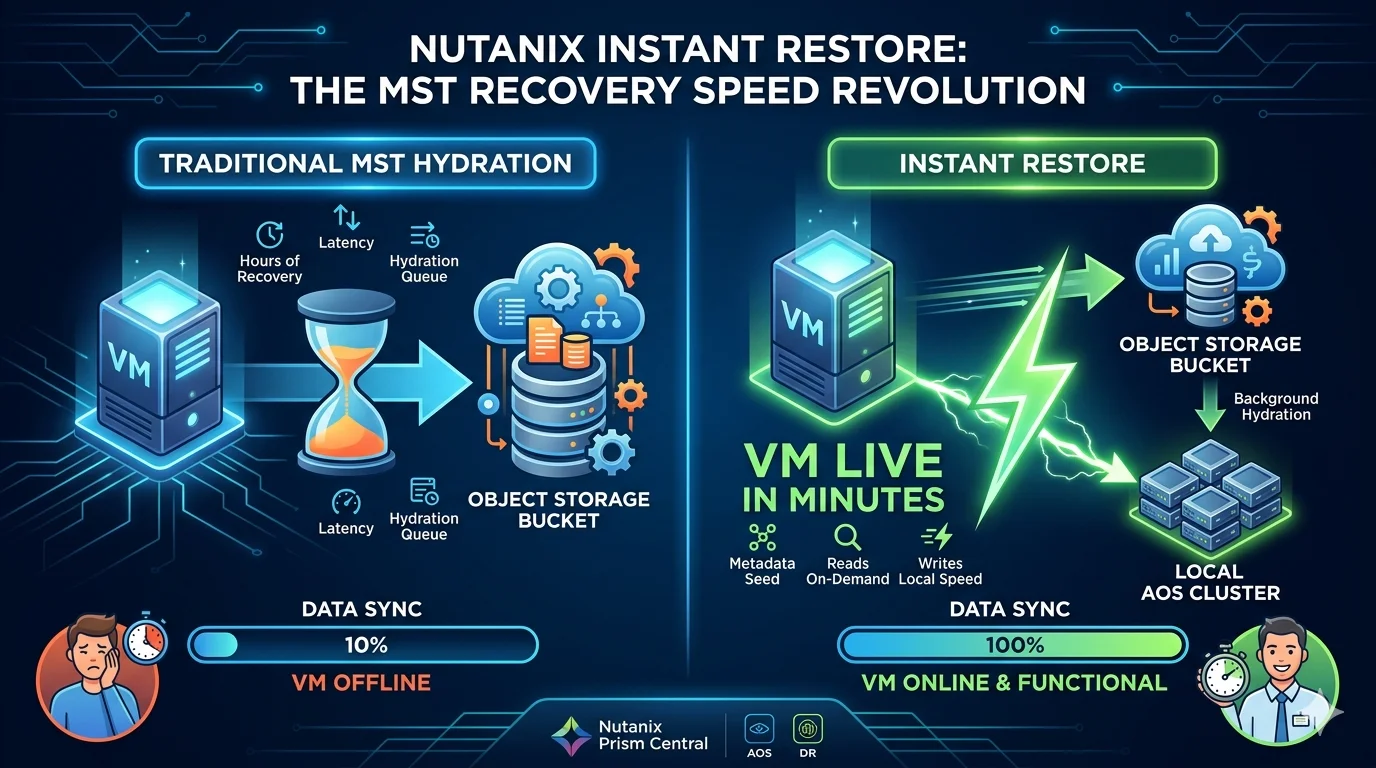
The Hydration Problem
Object storage is excellent at what it does. It is durable, geographically distributed, and cost-effective for storing large volumes of data - and yes that includes snapshots. What it is not is fast in the way block storage is fast. When you are recovering a VM from an MST snapshot, the AOS cluster has to pull that data back from the object store before the workload can power on. For smaller VMs, that window is manageable. For anything with hundreds of gigabytes or more of disk, you are looking at a hydration queue that can stretch into hours depending on throughput and the size of the recovery set.
The protection is there, the snapshots are there, but the recovery time was always the asterisk in the conversation. If your RTO target is measured in minutes and your hydration window is measured in hours, that gap is not just a technical detail. It is a compliance risk and an operational problem.
What Instant Restore Changes
Instant Restore, now generally available in AOS and Prism Central 7.5.1, takes a simple but powerful approach to solving this. It applies to both VMs and Volume Groups (VGs), and instead of waiting for full hydration before powering on a workload, it splits recovery into two phases.
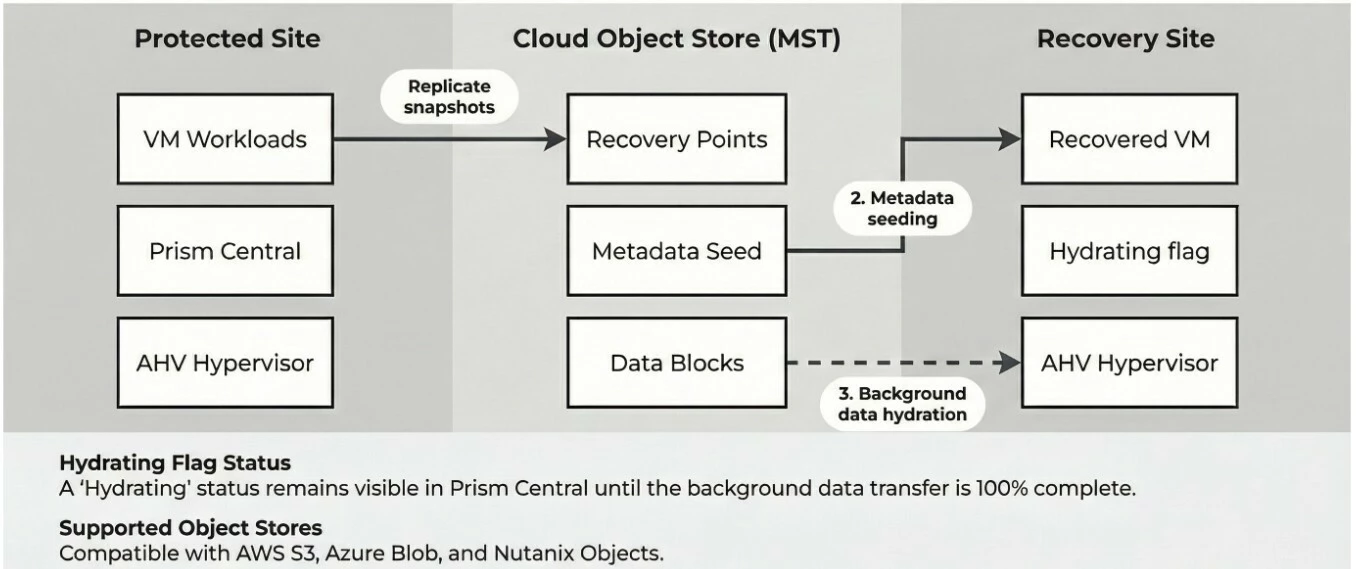
The first phase seeds the VM metadata onto the AOS cluster and powers the VM on. This happens in seconds to minutes. The VM is live, accessible, and doing work.
The second phase handles full data hydration in the background. Any read requests for blocks that have not been pulled down yet are served transparently from the originating object store. The VM does not know the difference, and neither do your users. One detail worth highlighting: write performance is unaffected from the start. Writes go directly to local AOS storage at full speed, so your applications are not operating in a degraded state while hydration catches up.
As hydration progresses, Prism Central flags the recovered entity with a "Hydrating" status, and the VM details page shows a real-time progress percentage and remaining storage so you always know where things stand. Once it completes, the flag clears and the VM operates entirely from local storage.
The net effect is that your RTO for MST-protected workloads drops from hours to minutes. That is the kind of shift that changes how you design protection policies.
What This Means for Administrators
From an operational standpoint, this is one of those features that removes a constraint you have been designing around. If you have been steering latency-sensitive workloads away from MST because the recovery window did not meet your SLA, that calculus changes now. Clinical applications, financial systems, operational databases: these are workloads where every minute of downtime has a measurable cost, and Instant Restore brings them into the MST conversation in a way that was harder to justify before.
You have two paths to trigger it. For ad-hoc recoveries, you can use out-of-band snapshots through the VM Recovery Points view in Prism Central: locate the recovery point, choose Clone, select Instant Restore, and the VM is live in minutes. For orchestrated DR scenarios, Instant Restore integrates directly into recovery plans. When executing an unplanned or test failover, you simply enable the Instant Restore option for MST-protected entities and the recovery plan handles the rest. Planned failovers do not need it since data is already pre-staged.
Nutanix recommends co-locating Prism Central, Prism Element, MST, and the object store within the same cloud availability zone or datacenter for optimal instant recovery performance. That is worth factoring into your architecture decisions early.
There are a few things to keep in mind as you plan around this. While background hydration is in progress, the recovered VM cannot be snapshotted, cloned, or replicated to a non-MST availability zone. These operations become available once hydration completes and all data is locally present. These are reasonable constraints, but they are worth understanding before you build your runbooks around the feature.
Wrapping Up the Series
Instant Restore is the feature that prompted me to revisit MST from the ground up, and having walked through the technology overview, deployment models, and now Instant Restore itself, I think the picture is clear. MST has matured into a genuinely viable DR strategy for a broad range of workloads, not just the ones where you could tolerate a long recovery window.
Instant Restore is not the whole story, but it closes the gap that has kept MST from being a complete answer for mission-critical workloads. For those of us who have spent time explaining hydration windows to customers, that is a welcome change.
Exploring MST for your DR strategy or rethinking how you protect mission-critical workloads? I'd love to hear how you're approaching it. Connect with me on LinkedIn or reach out at mike@mikedent.io.