Nutanix Automation Tools Compared: Finding the Right Fit
Overview
I've spent the past several months diving into automation for Nutanix, and the learning curve has been steeper than I expected. Not because the tools are bad, but because each one approaches automation differently, and figuring out which tool fits which task took more trial and error than I anticipated. My goal was simple: build useful automation that makes managing Nutanix infrastructure easier. Getting there meant learning PowerShell, Python, Ansible, and Terraform well enough to know when to reach for each one.
A quick disclaimer before we dive in: I'm still learning this landscape myself. I'm sharing what I've discovered so far, but I'm absolutely not claiming this is the definitive guide or the only way to approach Nutanix automation. If you're more experienced and see better approaches, I'd genuinely love to hear about them. This is as much about documenting my own learning journey as it is about helping others who might be starting from a similar place.
Going in, I wanted to consolidate on a single tool. One language, one framework, one way of doing things. What I'm learning through this journey is that one size doesn't fit all. Each tool has strengths that make it the right choice for certain tasks and the wrong choice for others. That realization has made this process equal parts fun, educational, and frustrating. Take category management for example: I wanted to read from a CSV and create category key/value pairs in bulk, as well as assigning them to VMs. My instinct said Python or PowerShell would be the natural fit for parsing a file and looping through API calls. But once I understood how Ansible handles CSV lookups natively, it completely changed my thinking about which tool belonged where.
The API Landscape Today
Nutanix offers four publicly available API collections. While you'll see legacy versions (v0.8, v1, v2, and v3) mentioned in the Nutanix Prism REST API Explorer, Nutanix has strongly recommended either using or migrating to the v4 APIs or SDKs. The versions available in your environment depend on your AOS or Prism Central version. Here's the current landscape:
v1 (Prism Element only) - Legacy API, migration to v4 recommended.
v2.0 (Prism Element only) - Cluster-specific, designed to manage entities within a single cluster. Handles VM provisioning, storage container management, and local health monitoring. If you've written scripts to automate tasks on individual clusters, this is probably what you're using. Also on the deprecation path.
v3 (Prism Central only) - Built around what Nutanix calls an "intentful" paradigm, the v3 API lets you define a desired state and allows the system to determine how to get there. Think of it as the configuration management approach applied to infrastructure APIs. Scheduled for deprecation.
v4 (GA/Generally Available, Prism Central only) - This is the big one. It's a ground-up rewrite that Nutanix positions as the future of their entire API surface. With GA status achieved in Prism Central pc.2024.3, the v4 API is designed to provide a comprehensive and consistent set of APIs for operating the Nutanix Cloud Platform. Each subsequent Prism Central release expands the v4 API namespace further.
Notice the pattern? Three of the four current API versions are either legacy or scheduled for deprecation, and the future of the platform (v4) is built exclusively for Prism Central with no plans to bring it to Prism Element.
Finding the Right Tool for the Job: A Personal Journey
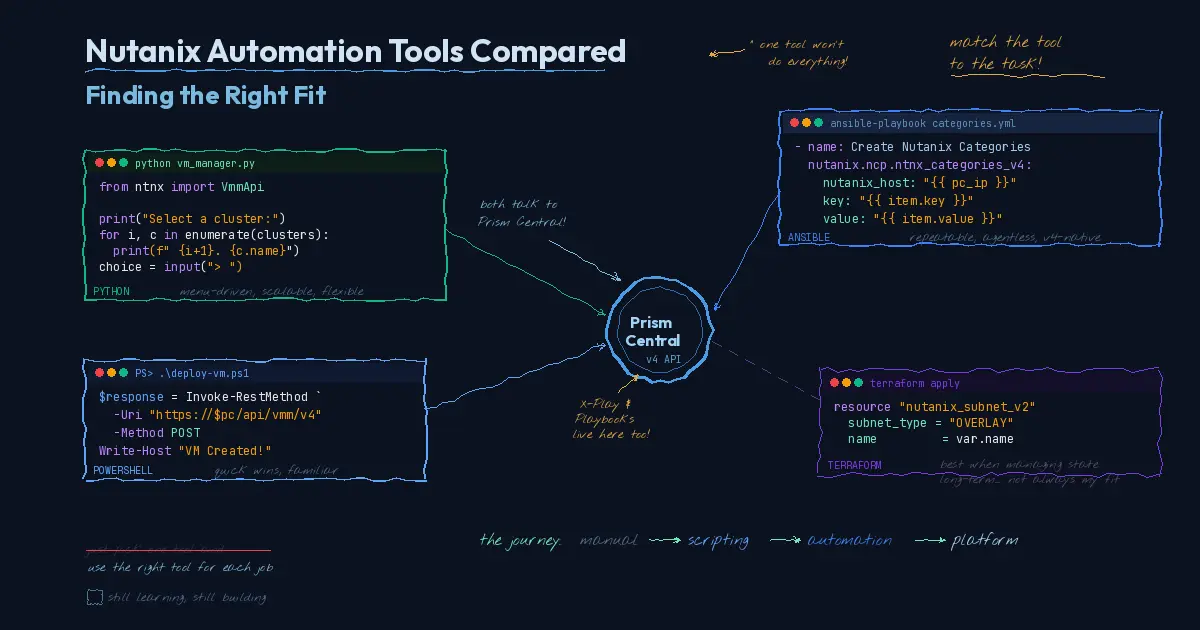
As I've worked through my own automation goals on Nutanix, one of the biggest lessons has been that no single tool does everything well. The landscape of options is broad: PowerShell, Python with the Nutanix SDK, Ansible, Terraform, and Nutanix's own X-Play and Playbooks through Nutanix Cloud Manager. Each one brings real strengths, but they shine in different contexts.
Early on, my instinct was to pick one tool and build everything in it. When that didn't feel right, I went the other direction: I'd take a project, like uploading and managing images across clusters, and try to build it in every tool just to compare. That turned out to be more educational than I expected, but not always in the way I hoped. Some tools made the task elegant. Others fought me the entire way. A workflow that felt natural in Python became awkward in Ansible. Something that Terraform handled cleanly required twice the code in PowerShell.
The lesson wasn't that any tool was bad. It was that forcing the same project into every tool exposed where each one's design assumptions help you and where they work against you. Once I stopped trying to make one tool do everything and started matching tools to tasks, the automation got better and the frustration went away.
Here's what I've found.
Ansible: Repeatability and the v4 API Sweet Spot
Ansible paired with the v4 APIs has become one of my go-to approaches, and for good reason. The combination offers a great deal of functionality with easy repeatability. You define your desired state in a playbook, run it, and get consistent results every time. Need to apply the same configuration across multiple clusters or deploy a standard set of VMs with specific settings? Ansible handles that cleanly.
The agentless model keeps things simple too. There's no persistent runtime to maintain, no agents to install on target systems. You point it at Prism Central, define what you want, and let it execute. For standardized, repeatable operations, it's hard to beat.
Where Ansible starts to show its limits is when you need interactivity. Ansible playbooks are designed to execute a predefined plan. They're not built for workflows where an admin needs to make decisions at runtime based on what they're seeing in the environment.
Python: Scalability and User Interaction
Python with the Nutanix SDK is where I go when the task demands flexibility. It's the most scalable option in the toolbox because you can build custom workflows with complex logic, conditional branching, robust error handling, and chained API calls that would be awkward or impossible to express in a declarative tool.
One of the things I value most about Python is the ability to create menu-driven, interactive scripts. You can build a tool that presents an admin with choices, collects input, validates selections, and then executes accordingly. That kind of guided user interaction isn't something you get from Ansible or Terraform. When you're handing automation off to a team that needs to make runtime decisions, like choosing a target cluster, selecting a VM template, or specifying resource configurations, Python gives you the flexibility to build that conversational layer into the workflow.
PowerShell: The Quick Win
Sometimes the easiest path is the right one. PowerShell has been my go-to for getting things done quickly, especially in environments where Windows is the primary operating system. The syntax is familiar, the learning curve is manageable, and for smaller-scope tasks, it gets you from idea to working script with the least overhead.
Like Python, PowerShell supports interactive, menu-driven workflows. You can prompt admins for input, present choices, and guide them through a process step by step. For teams that are already comfortable in the Windows ecosystem, this can be the fastest way to put useful automation in people's hands.
Where PowerShell gives ground to Python is at scale. As workflows get more complex or need to span multiple systems and API calls, Python's ecosystem and the Nutanix SDK provide a more robust foundation. But for targeted tasks and quick wins, PowerShell remains a solid choice.
Terraform: A Harder Fit for Deploy-and-Configure Workflows
Terraform is a powerful tool, and I understand why it has a strong following. For organizations managing long-lived infrastructure as code with full lifecycle management, it's excellent. The state file, the plan-and-apply workflow, the drift detection: all of those features make sense when you're maintaining infrastructure over time.
But here's my honest take: for my use case, Terraform has the weakest value proposition among the tools I've worked with. My automation tends to focus on deployment and initial configuration rather than long-term state management. I'm standing up VMs, applying initial configurations, handing them off, and moving on. If you're not managing the state file long term, you're carrying the overhead of Terraform's state management and provider configurations without the ongoing payoff that justifies it.
That's not a knock on Terraform as a tool. It's a recognition that the tool's strengths don't align with every workflow. If your environment involves frequent provisioning and teardown cycles, or if you're managing infrastructure that truly benefits from declarative state tracking over months and years, Terraform earns its keep. For deploy-and-configure workflows where the automation's job is done once the environment is stood up, the other tools in the toolbox serve me better.
X-Play and Playbooks: The On-Ramp You're Already Sitting On
And then there's the option that lives inside Prism Central itself. Nutanix Cloud Manager includes X-Play and Playbooks, a low-code, no-code automation engine built right into the platform. If you've ever used IFTTT or Zapier, it's the same concept applied to infrastructure operations.
X-Play's triggers can be alert-based, time-based, event-driven, or webhook-initiated from external tools. The actions cover VM management, alerting, reporting, category assignments, and integrations with third-party platforms like Slack, Microsoft Teams, Ansible, and ServiceNow.
A common example: X-Play's machine learning engine detects a memory-constrained VM. A playbook automatically snapshots the VM, adds memory, resolves the alert, and sends a notification. That entire workflow, which previously required manual intervention every time, runs on its own.
For admins who are already comfortable with scripting and APIs, Playbooks go further. You can clone the built-in REST API action to make calls to virtually anything, and you can plug existing PowerShell or SSH scripts directly into playbook actions. Playbooks aren't just a simplified automation layer for beginners. They're a bridge between no-code operations and full API-driven automation.
Seeing the Differences: Side by Side
Theory is one thing. Seeing how each tool handles the same operation tells you more in thirty seconds than any feature comparison matrix. Below are two common tasks, creating a category and creating a subnet, shown across all four tools using the Nutanix v4 API through Prism Central.
Feature Comparison
| Feature | PowerShell | Python SDK | Ansible | Terraform |
|---|---|---|---|---|
| Create categories | ✅ REST call | ✅ SDK client | ✅ ntnx_categories_v2 | ✅ nutanix_category_v2 |
| Create subnets | ✅ REST call | ✅ SDK client | ✅ ntnx_subnets_v2 | ✅ nutanix_subnet_v2 |
| Assign categories to VMs | ✅ PUT with ETag | ✅ SDK update | ✅ ntnx_vms_v2 | ✅ nutanix_vm_v2 |
| Multi-cluster operations | ⚠️ Loop per cluster | ✅ Loop with SDK | ✅ Inventory-driven | ⚠️ Workspaces/for_each |
| Interactive/menu-driven | ✅ Read-Host prompts | ✅ Full flexibility | ❌ Not designed for it | ❌ Not designed for it |
| Dry run/plan mode | ❌ | ⚠️ Custom logic | ✅ --check mode | ✅ terraform plan |
| Idempotent operations | ❌ Manual checks | ⚠️ Custom logic | ✅ Module handles | ✅ State-based |
| State management | Stateless | Stateless | Stateless | Stateful (tfstate) |
| Error handling | ⚠️ Try/catch on REST | ✅ SDK exceptions | ✅ Built-in retries | ✅ Provider-managed |
| API version | v4 REST direct | v4 SDK | v4 (collection v2) | v4 (provider) |
| Cross-platform | ⚠️ PowerShell 7+ | ✅ Python 3.9+ | ✅ Any OS | ✅ Any OS |
| CI/CD friendly | ⚠️ Non-interactive flag | ✅ Fully scriptable | ✅ Fully scriptable | ✅ Fully scriptable |
| Learning curve | Low (familiar syntax) | Medium (SDK + Python) | Medium (YAML + modules) | Medium (HCL + state) |
| Best for | Quick wins, Windows shops | Complex workflows | Repeatable deployments | Long-lived infra as code |
Authentication and connection setup are omitted for brevity. These code samples may not be fully functional as written; they're here to illustrate the differences in approach and give you a sense of what's possible with each tool, not to serve as copy-and-paste templates.
Example 1: Creating a Category Key/Value Pair
PowerShell Category
 1$body = @{
 2    key   = "Environment"
 3    value = "Production"
 4    description = "Environment category"
 5} | ConvertTo-Json
 6
 7$params = @{
 8    Uri     = "https://$($pc_ip):9440/api/prism/v4.0/config/categories"
 9    Method  = "Post"
10    Headers = $default_headers
11    Body    = $body
12    SkipCertificateCheck = $true
13}
14$response = Invoke-RestMethod @params
Python SDK Category
 1from ntnx_prism_py_client import ApiClient, Configuration
 2from ntnx_prism_py_client.api import CategoriesApi
 3from ntnx_prism_py_client.models import Category
 4
 5config = Configuration()
 6config.host = pc_ip
 7config.username = username
 8config.password = password
 9config.verify_ssl = False
10
11client = ApiClient(configuration=config)
12api = CategoriesApi(api_client=client)
13
14category = Category(
15    key="Environment",
16    value="Production",
17    description="Environment category"
18)
19response = api.create_category(body=category)
Ansible Category
 1- name: Create category
 2  nutanix.ncp.ntnx_categories_v2:
 3    nutanix_host: "{{ pc_ip }}"
 4    nutanix_username: "{{ username }}"
 5    nutanix_password: "{{ password }}"
 6    validate_certs: false
 7    key: "Environment"
 8    value: "Production"
 9    description: "Environment category"
10    state: present
Terraform Category
1resource "nutanix_category_v2" "environment" {
2  key         = "Environment"
3  value       = "Production"
4  description = "Environment category"
5}
The progression here is striking. PowerShell gives you full control but requires you to manage every detail of the REST call. Python abstracts the HTTP layer through the SDK but still requires you to instantiate clients and models. Ansible reduces the operation to a handful of declarative parameters. Terraform goes even further, but carries the overhead of state management that may not be justified for a simple category creation.
Example 2: Creating a Subnet
PowerShell Subnet
 1$body = @{
 2    name             = "VLAN100-Production"
 3    subnetType       = "VLAN"
 4    networkId        = 100
 5    clusterReference = $cluster_ext_id
 6    ipConfig         = @(
 7        @{
 8            ipv4 = @{
 9                defaultGatewayIp = @{ value = "10.0.100.1" }
10                ipSubnet         = @{
11                    ip          = @{ value = "10.0.100.0" }
12                    prefixLength = 24
13                }
14                dhcpServerAddress = @{ value = "10.0.100.254" }
15                poolList          = @(
16                    @{
17                        startIp = @{ value = "10.0.100.100" }
18                        endIp   = @{ value = "10.0.100.200" }
19                    }
20                )
21            }
22        }
23    )
24} | ConvertTo-Json -Depth 10
25
26$params = @{
27    Uri     = "https://$($pc_ip):9440/api/networking/v4.0/config/subnets"
28    Method  = "Post"
29    Headers = $default_headers
30    Body    = $body
31    SkipCertificateCheck = $true
32}
33$response = Invoke-RestMethod @params
Python SDK Subnet
 1from ntnx_networking_py_client import ApiClient, Configuration
 2from ntnx_networking_py_client.api import SubnetsApi
 3from ntnx_networking_py_client.models import (
 4    Subnet, IPConfig, IPv4Config, IPv4Subnet,
 5    IPv4Address, IPv4Pool
 6)
 7
 8api = SubnetsApi(api_client=client)
 9
10subnet = Subnet(
11    name="VLAN100-Production",
12    subnet_type="VLAN",
13    network_id=100,
14    cluster_reference=cluster_ext_id,
15    ip_config=[
16        IPConfig(ipv4=IPv4Config(
17            default_gateway_ip=IPv4Address(value="10.0.100.1"),
18            ip_subnet=IPv4Subnet(
19                ip=IPv4Address(value="10.0.100.0"),
20                prefix_length=24
21            ),
22            dhcp_server_address=IPv4Address(value="10.0.100.254"),
23            pool_list=[IPv4Pool(
24                start_ip=IPv4Address(value="10.0.100.100"),
25                end_ip=IPv4Address(value="10.0.100.200")
26            )]
27        ))
28    ]
29)
30response = api.create_subnet(body=subnet)
Ansible Subnet
 1- name: Create production subnet
 2  nutanix.ncp.ntnx_subnets_v2:
 3    nutanix_host: "{{ pc_ip }}"
 4    nutanix_username: "{{ username }}"
 5    nutanix_password: "{{ password }}"
 6    validate_certs: false
 7    name: "VLAN100-Production"
 8    subnet_type: "VLAN"
 9    network_id: 100
10    cluster_reference: "{{ cluster_ext_id }}"
11    ip_config:
12      - ipv4:
13          default_gateway_ip:
14            value: "10.0.100.1"
15          ip_subnet:
16            ip:
17              value: "10.0.100.0"
18            prefix_length: 24
19          dhcp_server_address:
20            value: "10.0.100.254"
21          pool_list:
22            - start_ip:
23                value: "10.0.100.100"
24              end_ip:
25                value: "10.0.100.200"
26    state: present
Terraform Subnet
 1resource "nutanix_subnet_v2" "production" {
 2  name              = "VLAN100-Production"
 3  subnet_type       = "VLAN"
 4  network_id        = 100
 5  cluster_reference = var.cluster_ext_id
 6
 7  ip_config {
 8    ipv4 {
 9      default_gateway_ip {
10        value = "10.0.100.1"
11      }
12      ip_subnet {
13        ip {
14          value = "10.0.100.0"
15        }
16        prefix_length = 24
17      }
18      dhcp_server_address {
19        value = "10.0.100.254"
20      }
21      pool_list {
22        start_ip {
23          value = "10.0.100.100"
24        }
25        end_ip {
26          value = "10.0.100.200"
27        }
28      }
29    }
30  }
31}
The subnet example makes the trade-offs more visible. With a more complex operation, PowerShell requires careful JSON nesting, and a typo in the structure means a cryptic API error. Python's SDK catches structural issues at the object level, but the model imports get verbose. Ansible and Terraform both express the same configuration declaratively, but Terraform will track this subnet in state and detect drift over time, which is valuable if you're managing the subnet lifecycle long-term.
Where this gets particularly interesting is when you need to create the same subnet across multiple clusters. In Python, you'd loop through a list of cluster IDs and call create_subnet for each. In Ansible, you'd use a loop or with_items directive. In Terraform, you'd use a for_each block. PowerShell would use a foreach loop. The mechanism differs, but the multi-cluster scenario is where Ansible's inventory-driven approach and Python's programmatic flexibility start to pull ahead of the others.
The API Shift and Why It Matters
This isn't a theoretical shift. Nutanix has published a formal deprecation timeline for legacy APIs. Versions v0.8, v1, v2, and v3 are all scheduled for deprecation starting with the AOS and PC upgrade release planned for Q4 of calendar year 2026.
Deprecation doesn't mean immediate removal. Nutanix has clarified that legacy APIs won't disappear on the deprecation date. They'll still function, but they'll no longer be supported. That's an important distinction for organizations running production automation against those endpoints. You can keep using them, but you're on your own if something breaks. The recommended path forward is migration to v4, and v4 only lives on Prism Central.
For environments that were built and automated around Prism Element, this requires more than a script rewrite. A lot of admins wrote PowerShell scripts, Python tools, and Ansible playbooks that talk directly to individual clusters through the v2.0 API. That approach worked well when each cluster operated as its own island. But moving to v4 means moving to a model where everything routes through a centralized management plane. That changes your network dependencies, your authentication model, and your failure domains.
But here's the broader reality in my opinion: PE-centric environments are becoming less and less the norm. The API deprecation is just one piece of a much larger trend. Prism Central has become an integral component of the Nutanix ecosystem in ways that go well beyond API development. Licensing management now runs through PC. Disaster recovery orchestration Leap requires it. Flow Networking and microsegmentation are PC features. Nutanix Cloud Manager, with its cost governance, security compliance, and self-service capabilities, all lives in Prism Central. Even the category system that underpins so much of Nutanix's policy and automation framework is a PC construct.
If you're still running without Prism Central, you're not just missing out on the v4 API. You're missing out on the platform capabilities that Nutanix is building its entire roadmap around. The question isn't really whether to adopt Prism Central anymore. For most organizations, that decision has already been made by the feature set.
That said, the dependency is worth acknowledging. If Prism Central goes down, your clusters keep running, but your automation layer, your DR orchestration, and your policy enforcement all depend on PC availability. That's not a reason to avoid the migration. It's a reason to plan it thoughtfully and treat Prism Central as the production-critical infrastructure it has become.
The Bigger Picture: Centralized Control Planes Are the Industry Direction
This consolidation toward Prism Central mirrors a broader industry pattern. VMware centralized management through vCenter. Microsoft is doing it with Azure Arc. AWS does it with Systems Manager. The local node becomes a managed endpoint, and the API surface consolidates upward into a centralized control plane.
For Nutanix, there's an interesting tension in this evolution. The original HCI pitch was simplicity and distributed resilience, eliminating single points of management failure. Consolidating the API and automation surface through Prism Central introduces a dependency that the original architecture was designed to avoid.
Nutanix clearly sees this as the natural evolution of managing infrastructure at scale, and for organizations running multiple clusters, the benefits of centralized automation, policy enforcement, and API consistency outweigh the added dependency. But it's a design consideration worth acknowledging, especially when planning your automation architecture.
Where to Start
If you're currently PE-centric in your operations, here's a practical path forward.
First, if you haven't already, deploy Prism Central and register your clusters. This is the foundation everything else builds on.
Second, explore X-Play and Playbooks before you start rewriting API scripts. Identify the manual, repetitive tasks you perform regularly: alert triage, VM snapshots, resource adjustments, notification workflows. Build a few playbooks around those. You'll get immediate operational value without writing any code.
Third, start familiarizing yourself with the v4 API. The documentation lives at developers.nutanix.com, and Nutanix provides SDKs for Python, Java, Go, and JavaScript. If you have existing v2.0 scripts, map out which operations you're performing and identify their v4 equivalents.
Fourth, think about which automation tool fits each use case. Ansible for repeatable, standardized operations across clusters. Python for complex, interactive workflows that need a menu-driven interface. PowerShell for quick wins in familiar environments. And if your use case genuinely involves long-term infrastructure lifecycle management, Terraform. Match the tool to the job, not the other way around.
Fifth, plan for the deprecation timeline. Q4 2026 isn't far away. Even though the legacy APIs won't disappear immediately, building new automation against deprecated endpoints is borrowing against the future.
The Bottom Line
Prism Element isn't going away. It still serves an important role as the local management interface for individual clusters. But the capabilities that Nutanix is building, the APIs, the automation tools, the machine learning-driven operations, all of that lives in Prism Central and is expanding there with every release.
For admins managing Nutanix environments today who want to leverage more automation, the message is straightforward: Prism Central is where your operational future lives. The API consolidation is making that less of a choice and more of an inevitability. The good news is that the on-ramp is already built. Whether you start with X-Play's no-code playbooks, Ansible's repeatable workflows, Python's flexible SDK, or PowerShell's familiar scripting environment, the tools are there and they're all talking to Prism Central.
The question isn't whether to make the shift. It's how soon you start, and which tool you pick up first.
Working through Nutanix automation or evaluating which tools fit your environment? I'd love to hear how you're approaching it. Connect with me on LinkedIn or reach out at mike@mikedent.io.