Nutanix Tech Connect 2026 Day 1: All About Cloud Native
Overview
It's been a little over a week since I walked out of Nutanix HQ in San Jose after two days at the invite-only Nutanix Tech Connect 2026. I'll admit it, I was a little too excited for this one. Think first day of school energy: backpack packed, lunchbox ready, and a fresh notebook I fully intended to fill. I did not write these recaps live from the room. Tech Connect is a firehose, and I wanted time to digest it, reread my (very scribbly) notes, and think about what it means for the customers I work with every week. I was ready, and little did I know one benefit of the Nutanix HQ is all the coffee you can drink, and I pushed the limits!
Before I get into the sessions, a word about the people. They're half the reason this event is so good. I got to spend two days with my NTC peers, including a bunch of folks I'd only ever known as a name and an avatar in Slack. Finally putting faces to those names was a highlight. The sessions were great, but so were the conversations in the hallways and over hotel lobby beverages and snacks that ran way later than they should have. Special thanks to the Brewers and Devil Rays for going 12 innings to keep us entertained. I came home with a full notebook, plenty of ideas, and new friends. What more can you ask for??
The class schedule split cleanly: Day 1 was all about cloud native, and Day 2 was all about AI. This post covers Day 1, with my take on each session along the way.
If you're running Nutanix today and wondering where Kubernetes fits into your platform, or whether NKP is ready for the AI and bare metal workloads your teams keep asking about, pull up a chair. This one is for you.
Setting the Stage
The day opened with a fireside chat with Thomas Cornely, who leads Product Management at Nutanix. A few numbers set the tone: more than 3,000 people in R&D and around 150 in Product Management, many of them deep experts in their area who build reference architectures from real world deployments. Thomas was clear that Nutanix keeps investing in that bench, bringing in and bringing back strong engineering and product talent. You can feel it in the depth of the people presenting, and it's a big reason the roadmap keeps moving as fast as it does.
The big theme was the evolution from HCI to a cloud platform, and not just a data platform but a compute platform.
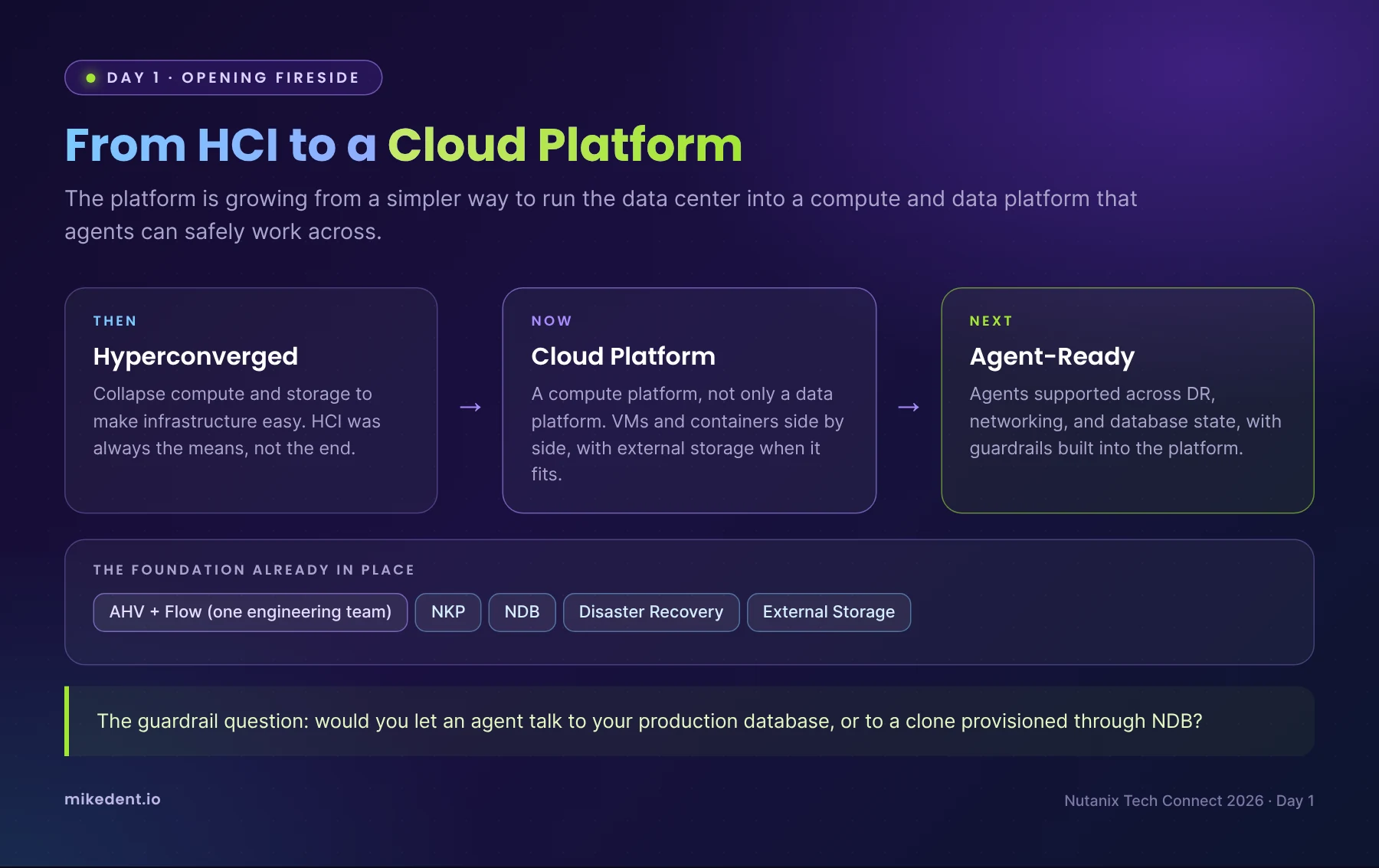
- Breaking silos. AHV and Flow now sit in the same engineering team on a common platform. The foundation is already there with NKP, NDB, and DR, and the goal is to support agents across all of it: DR, networking, and database state.
- Agents and production data. Thomas posed a great question to the room: Would you let an agent talk to your production database, or to a clone provisioned through NDB? Platform teams are going to need exactly that kind of guardrail thinking once agents show up.
- Why external storage. On bringing in external storage, his take was that HCI is a means to an end. Its job is to make things easy, and if Nutanix can deliver that same simplicity disaggregated, that's another win. When Broadcom changed VMware pricing, the opportunity was there and engineering jumped on it. Nutanix added 3,000 new logos in FY26, and I'm proud to know I helped with that number!
- Any compute, any storage. The direction is to open the platform up even further: run on just about any compute platform and connect to any storage array that supports NVMe over TCP. Customers keep the hardware they already own and still get the Nutanix operating model on top.
- Beyond AI. Thomas talked about changing how we think about running infrastructure: governance, quantum, and more. Internally, AI use has grown massively in the last six months, and Nutanix is using an AI gateway to steer engineers from frontier models back to on-premises models.
For years the conversation with customers started with "you have to go HCI," and that was a barrier for shops with a SAN they just paid for. Hearing Product Management say plainly that HCI is a means to an end tells me Nutanix is optimizing for meeting customers where they are, not for protecting an architecture. For organizations planning a VMware exit, that lowers the cost and the risk of the first step.
Still, the "any compute, any NVMe over TCP array" vision gives me a little pause. I love the flexibility, but there have to be limits! Part of what made Nutanix so reliable for so long was owning the whole stack and knowing exactly what was underneath it. Every new array and server in the mix is another firmware matrix, another performance profile, and another support conversation where two vendors point at each other. I'll be watching how Nutanix draws the lines on validation and support, because that's where flexibility turns into either a superpower or a headache.
On a lighter note, I love that Nutanix is running its own engineers through an AI gateway. Nothing motivates better cost controls than seeing the frontier model bill yourself.
Session Highlights
NKP: Infrastructure for the Next Decade
David, a Product Manager who came to Nutanix through the D2IQ acquisition that kick started NKP, walked through where NKP is headed for AI. Two years in, NKP has become the fastest growing product in the portfolio, and customers keep asking for the same thing: one platform that runs both VMs and containers, driven by AI. Kubernetes has to be ready not only for AI, but for agentic workloads, and more of those workloads are landing on bare metal.
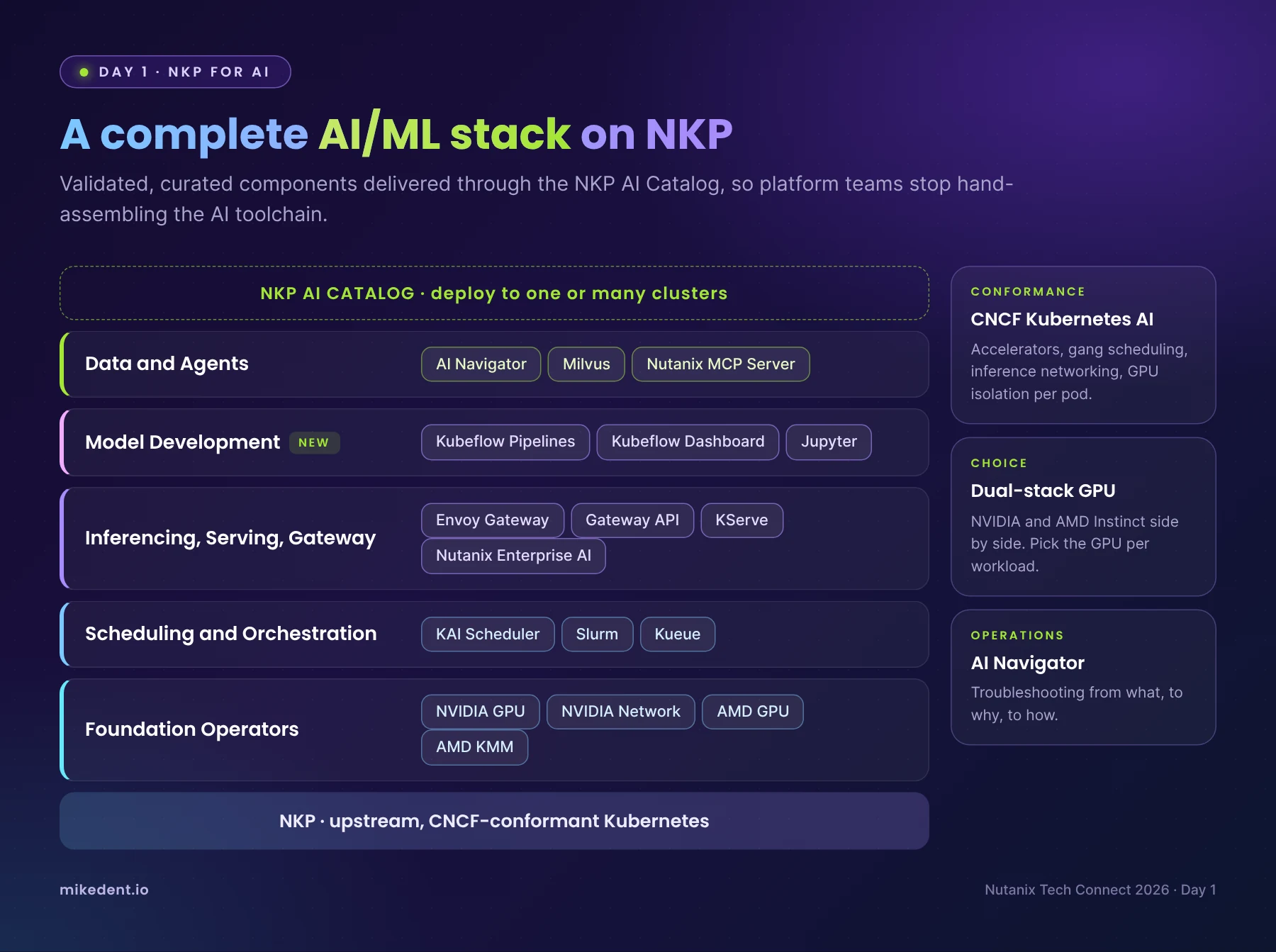
- CNCF Kubernetes AI Conformance. Any application built on upstream Kubernetes should run on NKP, keeping AI workloads portable. Conformance covers accelerators (GPU as a first class resource, GPU sharing, vGPU exposed like a physical device), scheduling (gang scheduling and autoscaling on accelerator nodes), networking and observability (Gateway API and GPU metrics in Prometheus), and security (GPU access isolated per pod).
- NKP AI Catalog. A curated, validated catalog of AI applications you can deploy to one or more NKP clusters.
- AMD GPU support. NKP is qualified on the AMD Instinct MI350 series, with the AMD GPU Operator in the catalog beside the NVIDIA one. Dual stack GPU support lets customers choose the GPU per workload, which matters with hardware shortages.
- A complete AI/ML stack out of the box. GPU and network operators at the foundation, KAI Scheduler, Slurm, and Kueue for scheduling, Envoy Gateway, KServe, and NAI for inferencing, Kubeflow and Jupyter for model development, and AI Navigator, Milvus, and the Nutanix MCP Server for data and agents.
- NKP AI Navigator. A troubleshooting assistant built on insights from real world Kubernetes deployments, Nutanix support cases, and KB articles. It walks you from what, to why, to how.
In my opinion, many organizations don't fail at AI because they picked the wrong model. They stall because a small infrastructure team is hand-stitching GPU operators, schedulers, serving, and vector databases together and then trying to keep it all patched. A validated catalog takes months out of that. The AMD support matters too. GPU lead times are still measured in months, so being able to run on whatever accelerator you can actually get your hands on is worth a lot.
NKP: What's New and What's Next
This was the deepest session of the day, and my pen was smoking by the end. NKP is aimed at three problems Kubernetes teams know well. Operations get complicated fast, scale gets fragmented across sites and clouds, and most platforms weren't built with AI in mind. Nutanix's answer is automation for Day 1 and Day 2, one console with one set of policies, and AI readiness baked in.
- Unified Nutanix Registry. NKP 2.19 consolidates every image under a single registry and namespace. Every image goes through RapidFort hardening and Harbor CVE scanning before publishing. Connected sites use a simple generate token, authenticate, deploy workflow. If you've ever handed a security team a long list of wildcard URLs to allow and watched their face, you'll appreciate this one.
- Projects 2.0. Projects 1.0 scoped NKP VMs, but images, categories, and volumes stayed behind in the default project. Projects 2.0 scopes everything NKP creates to a single Prism Central project, with RBAC and quotas applied.
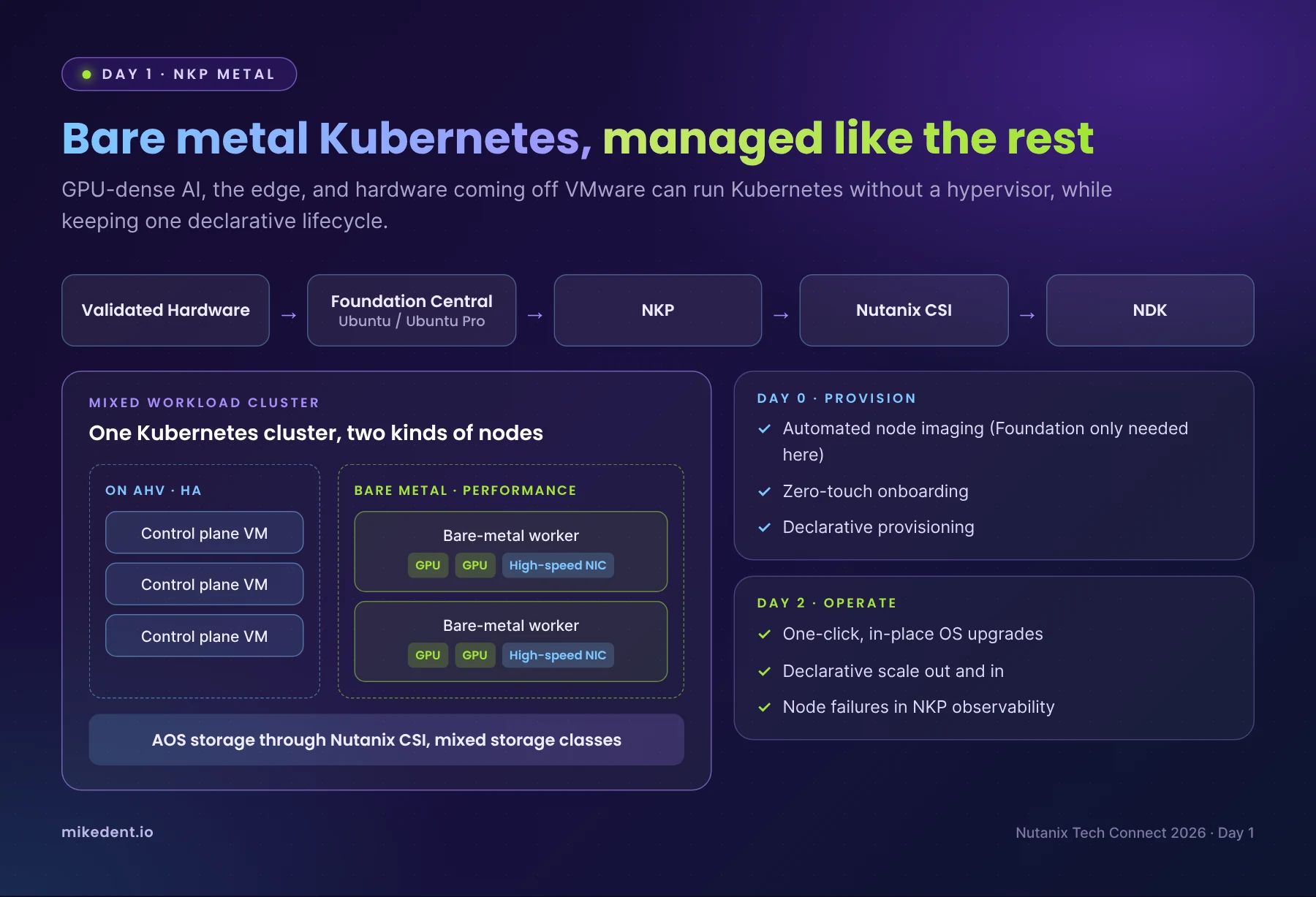
- NKP Metal. Bare metal use cases include GPU dense AI workloads, the edge, and repurposing hardware coming off VMware. The flow runs from validated hardware through Foundation Central (Ubuntu and Ubuntu Pro), NKP, Nutanix CSI, and NDK. Foundation is only needed for Day 0. After that, NKP handles in place OS upgrades, declarative scaling, and observability for bare metal nodes.
- Mixed workload clusters. You can run the control plane on VMs for HA and add bare metal workers for GPUs and high speed NICs. CSI now supports mixing virtual and bare metal nodes with different storage classes, which removes a blocker several people in the room had hit. The only question left is which placement gives the workload the best performance.
- Simpler upgrades. UI driven, declarative upgrades with automated preflight checks against Prism Central, AOS, and AHV, plus post-flight validation. It isn't integrated with LCM yet, but that's on the roadmap. Today, upgrading NKP also means upgrading Kubernetes, and the roadmap is to decouple the two.
- AHV VM Operator. Developers can provision and manage Nutanix VMs with the same Kubernetes APIs and tools they already use. Unlike KubeVirt style approaches, the VMs still run on AHV.
- Stretched clusters. A single Kubernetes cluster stretched across two data centers for metro HA, with instant failover during maintenance or a site failure. This is greenfield only for now.
- OS choice. The recommendation is Ubuntu or Ubuntu Pro rather than Rocky. The AI ecosystem targets Ubuntu, and Ubuntu Pro is bundled with NKP licensing.
My take: I was familiar with it, but still wrapping my head around the use case. Bare metal was the surprise of the day for me, and a good one. The "what about hardware coming off VMware" use case is one that's quite common, and until now the answer usually meant a separate platform and a separate team. Mixed workload clusters are the piece that makes this practical: keep the control plane on AHV where HA is easy, and put the GPU nodes on metal where every bit of performance counts. Projects 2.0 and the unified registry are less flashy, but they are what makes NKP pass a security review and a chargeback conversation. Those are the meetings where Kubernetes projects quietly go to die.
Cloud Native AOS and NDK
This session focused on storage and data protection for stateful Kubernetes workloads. Gartner expects half of Kubernetes applications to be stateful, and on bare metal there is no hypervisor to run AOS under. Cloud Native AOS fills that gap.
- Where it runs. Cloud Native AOS starts with NKP Metal and is also available on AWS on EC2 with EKS. OpenShift on bare metal is a target as well.
- What you get. Thin provisioning, data locality, replication factor, inline compression, and topology aware placement, with deduplication and erasure coding planned. It supports both RWO and RWX, so you can serve shared file workloads without separate file infrastructure.
- NDK for protection. CSI provisions storage but doesn't protect it. Nutanix Data Services for Kubernetes covers workloads on NCI, NKP on AOS, and NKP Metal on Cloud Native AOS, plus the NKP management cluster itself. NDK management is moving into the NKP UI so you can handle data services, protection policies, and storage from one console.
My take: As a DR and data protection guy, this session hit closest to home. "Kubernetes is stateless, so we don't need to back it up" is still something I think about, and every time I do, a little piece of me cries. It hasn't been true for a long time. What I like is the consistency. You get the same AOS data services and the same protection story whether a workload runs in a VM, in a container on AHV, or on bare metal. Bringing NDK into the NKP console means protection gets set up when the cluster gets built, not after the first outage.
NKP Insights
The last technical session focused on security and operations at fleet scale. Fair warning, the stats were sobering. Roughly 82% of organizations now run Kubernetes in production, 89% had at least one container or Kubernetes security incident in the past 12 months, and 46% of those lost revenue or customers because of it. Security drifts as fleets grow through configuration drift, upgrade blockers, alert fatigue, inconsistent policy, silent certificate expiry, and the skills gap.
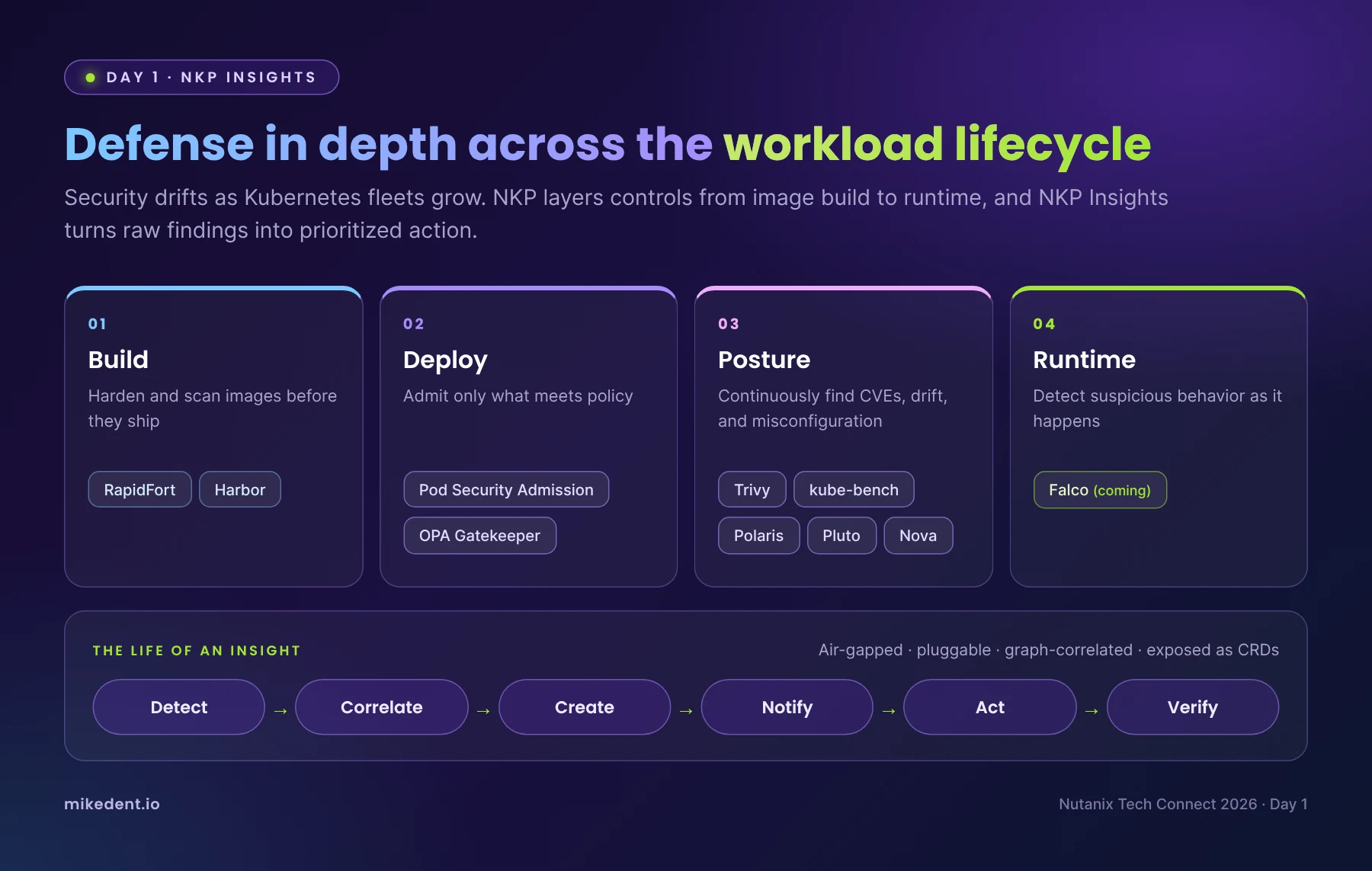
NKP answers with defense in depth across the workload lifecycle:
- Build. Hardened RapidFort images and Harbor registry scanning before anything ships.
- Deploy. Pod Security Admission and OPA Gatekeeper policies admit only what meets policy.
- Posture. NKP Insights continuously finds CVEs, drift, and misconfiguration with Trivy, kube-bench, and Polaris, plus upgrade blockers with Pluto and Nova.
- Runtime. Falco based runtime detection is coming in December.
Insights runs fully air gapped, uses a pluggable framework, and exposes everything as custom resources scoped to workspaces and projects. A local graph database maps relationships and blast radius without hammering the API. Each insight follows a lifecycle of detect, correlate, create, notify, act, and verify, and NKP Insights is included in NKP Ultimate. One request from the room that I'd echo: give app teams a namespace or project level view, and forward alerts through Prism Central so they don't get duplicated. A project level UI is on the roadmap.
That 46% number should end any debate about whether Kubernetes security is someone else's problem. I also like that Nutanix built this from open source tools teams already know, like Trivy, kube-bench, and Polaris, and then correlates them into one prioritized list instead of five dashboards. And for my public safety and healthcare customers, air gapped support isn't a nice to have. They can't use the tool without it.
Investing in the NTC Community
Tech Connect isn't only about product. Part of Day 1 was dedicated to the Nutanix Technology Champions program itself, and as a 10 year NTC, that time meant a lot to me.
Angelo, who leads the NTC program, walked us through how Nutanix is continuing to invest in the community, both in what it offers champions today and in where the program is headed over the next several years. More importantly, he handed the room the floor and asked for our feedback: what we value most, what we'd change, and what would make the program more useful to practitioners like us.
This is exactly why I love this program. Nutanix treats its champions like partners, not an audience. Being asked for candid feedback on the program, and seeing that feedback taken seriously year after year, is the same open culture that gives us direct access to Product Management and lets feedback from the field land with the people shaping the roadmap. Ten years in, it's still one of the most valuable communities I'm part of.
My Key Takeaways
A week of distance (and a lot of coffee) made the pattern clearer. If you run Nutanix, this is what I'd take away from Day 1.
- NKP is the center of gravity. Nearly every session came back to NKP, whether it was AI, bare metal, storage, or security. Nutanix is treating Kubernetes as a first class citizen beside AHV, not an add-on. If you've been putting off a container strategy, your platform vendor is no longer the reason to wait.
- Bare metal is real. Between NKP Metal, mixed workload clusters, and Cloud Native AOS, Nutanix has an answer for customers who want GPU dense or edge clusters without a hypervisor, while still managing them like the rest of the estate. You end up with one team and one toolset instead of two.
- Day 2 operations get the attention they deserve. The unified registry, Projects 2.0, preflight checks, and NKP Insights all target the work that happens after deployment. Most Kubernetes projects struggle after go-live, and it's where the cost of ownership piles up.
- Data protection is built in. With NDK moving into the NKP UI, protecting stateful workloads and the management cluster becomes part of the platform instead of a separate project.
- Guardrails come first with agents. Thomas's question about agents and production databases stuck with me. NDB clones, Projects, and policy enforcement are the building blocks for letting agents in safely.
Up Next: Day 2
If Day 1 was about building a cloud native foundation, Day 2 was about what runs on top of it. Same backpack, new subject. The whole day was focused on AI, from token economics to private inference and governance, and I'll break it down in my Day 2 recap on Friday.
Are you running NKP today, or still evaluating where Kubernetes fits into your Nutanix environment? I'd love to hear what's working for you, and which of these features you're most interested in.
Connect with me on LinkedIn or reach out at mike@mikedent.io.