Omnissa Horizon 8 Architecture on AHV
Overview
Welcome to my first post of 2026! Now that Omnissa Horizon 8 on Nutanix AHV is fully GA as part of the Horizon 8 2512 release, I've been kicking the tires and working through deploying the stack on AHV. For those used to deploying and managing Horizon on ESXi, the workflow is slightly different on AHV, but in a good way. The integration with Nutanix recovery points makes rollbacks much cleaner than what we had before in my opinion, though the jury is still out... I've never been a fan of snapshots on the vSphere side, so I like the flexibility here.
This post focuses on the architecture of Horizon on AHV and provides some comparisons between ESXi and AHV options.
Lab Deployment
From a management perspective, deploying Horizon on AHV is the same as we've been used to: deploy the Horizon Connection Server(s), a database for the Event Configuration, UAG, etc. One of the best things about the AHV integration with Horizon is that it does not require a separate or isolated installation. We can use the same Connection Server to support both vCenter and AHV workloads simultaneously, enabling users who are wanting to test out the deployment to use the same management components for both sides.
For this testing, my lab environment consists of a Nutanix cluster made up of three (3) Cisco UCS C240 nodes, each node has a NVIDIA Tesla T4 GPU (for future GPU testing). While not officially supported, this GPU-enabled cluster is running PC 7.5.0.1, AOS 7.5 and AHV 11.0. The Horizon components include:
- Horizon Connection Server: Single Windows Server 2025 VM running Horizon 2512
- Event Database: Rocky Linux VM running SQL Server (an unsupported but fun configuration to get working)
- Unified Access Gateway: Single UAG appliance for external access
- Nutanix Cluster: AHV cluster with Prism Central configured as a Capacity Provider
This is a minimal deployment for testing purposes. Production environments would typically include multiple Connection Servers for high availability, a supported SQL Server deployment, and redundant UAGs behind a load balancer. I won't cover the initial Horizon deployment or Capacity Provider configuration here, just architectural considerations.
Understanding Clone Architecture
For those coming from VMware, it's worth understanding how cloning works differently on AHV.
ESXi Instant Clone Architecture
When using vSphere capacity, an automated instant clone pool or farm is created from a golden image VM using the vSphere instant clone API. Horizon 8 creates several types of internal VMs (Internal Template, Replica VM, and Parent VM) to manage these clones in a more scalable way. Instant clones share the virtual disk of the replica VM and therefore consume less storage than full VMs. In addition, instant clones share the memory of the parent VM when they are first created, which contributes to fast provisioning. After the instant clone VM is provisioned and the machine starts to be used, additional memory is utilized. After it is provisioned, the clone is no longer linked to the parent VM.
Each ESXi host in the cluster that will run clones needs its own replica, and these replicas consume additional storage space. The replica creation process also adds time to pool provisioning and image updates, since Horizon must wait for replicas to be created on each host before clones can be provisioned.

AHV Clone Architecture
On AHV, as Graeme Gordon explained in the Omnissa community (and the below image is credited to him), there are no replicas with the AHV architecture. When a pool is created from a prepared AHV VM template, Horizon creates one internal template VM in the cluster. The clones are then created from that internal template VM as essentially delta disks that copy-on-write.
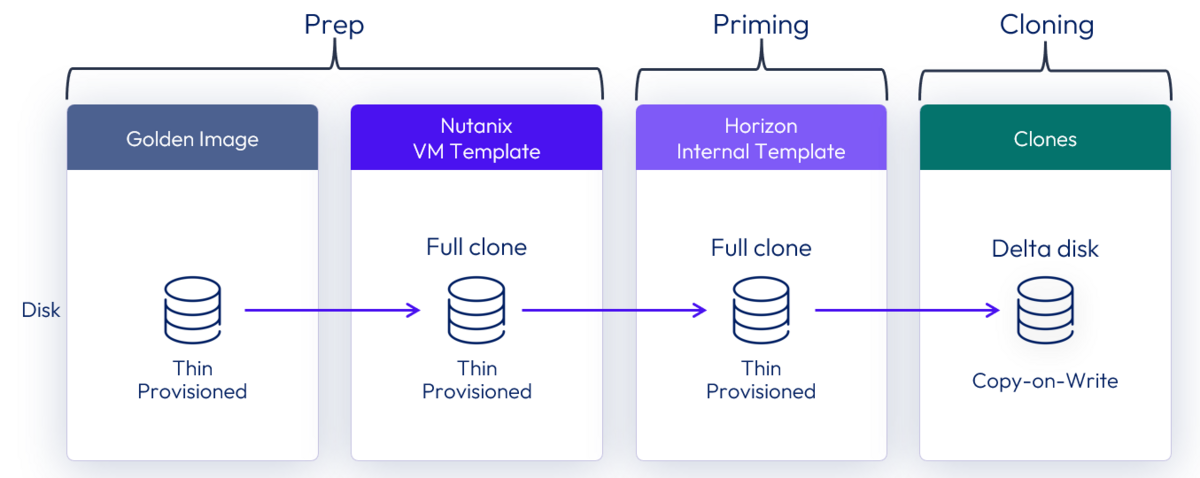
The AHV cloning mechanism leverages a block-level approach where clones initially reference the same underlying storage blocks as the source template. New storage is only allocated when a clone modifies data, triggering a copy-on-write operation for that specific block. This deduplication at the block level means clones start with minimal storage overhead.
The result is rapid provisioning and efficient storage utilization, especially valuable for non-persistent desktops where the majority of data remains identical to the golden image throughout the desktop's lifecycle.
A note on Shadow Clones: I initially thought Nutanix Shadow Clones would apply here, but Shadow Clones are only applicable when the hypervisor layer is VMware vSphere, not AHV. The AHV clone architecture described above handles the efficiency differently.
Key Architectural Differences: AHV vs ESXi
Clone Provisioning
ESXi:
- Requires replica VMs on each host
- Multi-tier architecture (golden image → replica → clones)
- Replica creation adds time to pool provisioning
- Replicas consume additional storage per host
AHV:
- No replica VMs needed
- Single-tier architecture (golden image → clones)
- Faster pool provisioning
- More efficient storage usage with block-level deduplication
Image Management
ESXi:
- Snapshot-based versioning
- Replica updates required across hosts
- More complex rollback procedures
AHV:
- Nutanix recovery point integration
- Single internal template per pool
- Simplified rollback using recovery points
Storage Efficiency
ESXi:
- Replicas required per host
- Storage grows with number of hosts
AHV:
- Block-level deduplication from the start
- Storage grows only with unique writes
- More predictable storage consumption
What's Next
Now that we've covered the architecture, the next post will dive into building and maintaining golden images for Horizon on AHV, including the Day Zero build process and Day Two update workflows.
Feedback Welcome
Since Horizon 8 on AHV is new, I'm still kicking the tires on everything. Have thoughts on Horizon 8 on AHV? I'd love to hear from you. Connect with me on LinkedIn or drop me a note at mike@mikedent.io.
References
- Omnissa Docs: Preparing a Golden Image on Nutanix
- Nutanix Best Practices: Omnissa Horizon on Nutanix
- My previous post on the Omnissa Horizon AHV announcement
Series Navigation
- Part 1: Omnissa Horizon 8 Architecture on AHV (this post)
- Part 2: Horizon 8 Image Management on AHV
- Part 3: Desktop Pools on AHV