Nutanix Disaster Recovery Guide 2025: Series Conclusion
Overview
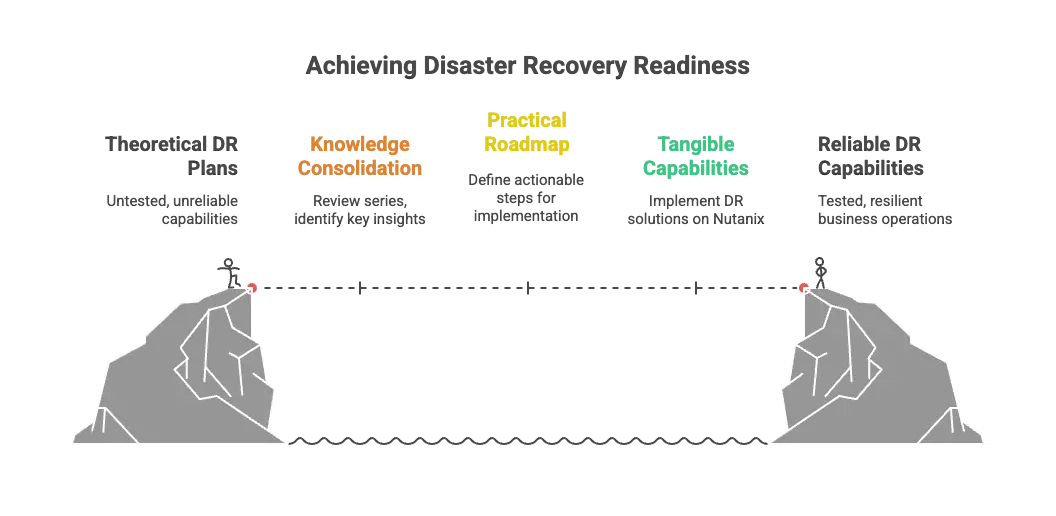
Over the past nine posts, I've journeyed from the fundamental question of "why disaster recovery matters" through the technical details of implementing comprehensive business continuity with Nutanix. We've covered the risks, the solutions, the configuration, the testing, the operational procedures, advanced automation, and proactive monitoring that transform theoretical DR plans into proven, reliable capabilities. This conclusion brings it all together with a practical roadmap for action.
How This Series Came to Be
This series started from conversations with customers about disaster recovery: the questions they were asking, the challenges they were facing, and the solutions they were implementing. Those discussions made it clear that while DR technology has evolved dramatically, many organizations still struggle with where to start and how to build truly resilient infrastructure.
The momentum continued when I had the opportunity to join Dwane and Angelo from Nutanix on the Nutanix Community Podcast to discuss "The New Rules of Disaster Recovery: Fast, Flexible, Cloud-Ready." That conversation reinforced just how much the DR landscape has changed and how modern platforms are making enterprise-grade business continuity accessible to organizations of all sizes.
From there, the series expanded through various topics, from fundamental concepts through advanced automation and monitoring strategies. It's been a fun series to put together, exploring everything from the "why" of DR through the tactical "how" of implementation.
But as with most things, this conclusion post marks the 10th installment in the series, which feels like a natural place to stop and move on to other topics. Ten posts feels complete. We've covered the full DR lifecycle from business case through operational excellence.
Now it's time to bring it all together. This conclusion isn't just a summary; it's a roadmap for action. Whether you're just starting your DR journey or optimizing an existing implementation, understanding how all these pieces fit together is critical for building truly resilient infrastructure.
The Implementation Reality
Let's talk about what implementing comprehensive DR actually looks like.
Start with Assessment
You can't protect what you don't understand. Begin with thorough discovery:
- Application inventory: What actually needs protection? Include shadow IT, cloud services, and external dependencies.
- Dependency mapping: What relies on what? Document startup sequences and integration points.
- RPO/RTO requirements: What can the business actually tolerate? Get specific answers from business owners, not IT assumptions.
- Bandwidth assessment: What network capacity exists between sites? Measure don't estimate.
- Compliance requirements: What do regulations actually mandate? Healthcare, finance, and government face specific rules.
Build Incrementally
Don't try to protect everything on day one. Prioritize strategically:
Phase 1: Critical Tier 1 Applications
Start with applications where downtime creates immediate business impact. These are your revenue generators, customer-facing systems, and regulatory must-haves. Get these protected first, tested thoroughly, and operationally validated.
Phase 2: Important Tier 2 Workloads
Expand to applications where downtime is painful but not catastrophic. These might tolerate longer RTOs and higher RPOs, allowing more cost-effective protection strategies.
Phase 3: Tier 3 and Operational Systems
Include remaining workloads that contribute to operations but can be recovered over longer timeframes. Some might not need DR at all; they can be rebuilt from scratch if needed.
Test Relentlessly
Testing isn't validation that everything works. It's continuous improvement:
- Quarterly minimum: Test production recovery plans at least once per quarter
- After any significant change: Test following applications, infrastructure, or network configuration updates
- Multiple scenarios: Include planned failover, unplanned failover, partial failures, and failback
- Document everything: Capture what worked, what failed, and what surprised you
- Involve stakeholders: Business users need to validate that recovered applications actually work
Automate Ruthlessly
Manual processes fail under pressure. Automate everything possible:
- Category-based protection for automatic inclusion of new VMs
- Policy-driven snapshots and replication
- Orchestrated boot sequencing through Recovery Plans
- In-guest scripts for network reconfiguration and application startup
- Monitoring and alerting for replication health
Maintain Obsessively
DR isn't "set it and forget it." It requires ongoing attention:
- Monthly reviews: Audit protection policy coverage and VM inclusion
- Quarterly validation: Verify Recovery Plan accuracy through testing
- Regular updates: Keep documentation and runbooks current
- Continuous monitoring: Track replication status and health metrics
- Capacity planning: Plan for storage growth at recovery sites
The Call to Action: Where Do You Go From Here?
If you've made it through all nine parts of this series, you have the knowledge. Now you need the action plan.
If You Have No DR Today
Step 1: Stop Procrastinating
I know it's uncomfortable. I know there are a million other priorities. But the statistics don't lie: downtime costs average $300,000 per hour (if not more), and it's not a matter of if, but when.
Schedule a meeting with leadership. Show them the business case. Get budget approval. Your career will survive making DR a priority. It might not survive being the person in charge when disaster strikes and there's no recovery plan.
Step 2: Start Small, Start Now
You don't need to protect everything immediately. Choose your top 5 critical applications and implement Protection Policies and Recovery Plans for those workloads. Test them quarterly. Prove the concept works. Then expand.
Step 3: Build the Foundation
- Establish Availability Zone pairing between primary and recovery sites
- Configure network connectivity for replication
- Deploy Prism Central if you haven't already
- Start with Async replication (it's the most cost-effective)
- Create your first Recovery Plan with proper boot sequencing
Within 90 days, you can have basic DR protection operational for your most critical workloads. Will it be perfect? No. Will it be better than nothing? Absolutely.
If You Have Basic DR
Step 1: Test What You Have
When was the last time you actually tested failover? Not "we checked that replication is working," but actually failed over, validated applications, had users test functionality, and documented results?
Schedule a test failover within the next 30 days. Use isolated test networks. Get business stakeholders involved. Document what works and what doesn't. Fix what's broken.
Step 2: Expand Coverage
You're probably protecting your Tier 1 applications. What about Tier 2? What about the supporting infrastructure that Tier 1 depends on? Identity services, DNS, monitoring, and logging all need protection too.
Review your application inventory against your current DR coverage. Identify gaps. Prioritize. Implement.
Step 3: Improve Automation
Are you still managing protection at the individual VM level? Migrate to category-based protection. Are your Recovery Plans just "power everything on and hope"? Implement proper boot sequencing. Are you manually tracking what's protected? Let policies handle it.
More importantly:
- Deploy in-guest scripts to automate DNS reconfiguration, IP changes, and application-specific settings during failover
- Set up replication monitoring with alerts for failed protection policies or stale recovery points
- Automate recovery validation checks post-failover
The goal is reducing human intervention. Manual processes fail under pressure. Automation scales.
If You Have Mature DR
Step 1: Validate Reality vs. Assumptions
Your documentation says RTO is 4 hours. When was the last time you measured actual recovery time in a realistic test? Your RPO is set to 1 hour. Have business owners confirmed they can actually tolerate losing an hour of data?
Test your assumptions. Measure actual performance. Validate that your technical capabilities align with business requirements.
Step 2: Optimize for Efficiency
Are you over-protecting applications that don't need aggressive RPOs? Are you under-protecting workloads that have become more critical? Review your Protection Policies against actual business needs.
Can you reduce costs by moving some workloads to less frequent replication? Should you increase protection for applications that have grown in importance? Optimization is ongoing.
Step 3: Extend to Edge Cases
What about applications running in public cloud that aren't covered by your on-premises DR? What about SaaS dependencies? What about partner integrations and external services?
Modern businesses don't run in isolated data centers. Your DR strategy needs to account for the complete application ecosystem, not just what runs on your infrastructure.
For Everyone: The Cultural Shift
Technology is the easy part. The hard part is organizational culture.
Make DR Part of Operations
DR testing shouldn't be an annual event that disrupts everyone's schedule. It should be a routine operational procedure that happens quarterly, involves business stakeholders, and generates continuous improvement.
Treat DR tests like fire drills: expected, practiced, and valuable learning opportunities.
Include DR in Change Management
Every significant infrastructure change, application deployment, or network modification should trigger a DR review. Did this change affect protection? Do Recovery Plans need updates? Should testing be scheduled to validate the changes?
DR isn't a separate domain. It's part of operational excellence.
Build DR Literacy
Your entire IT organization should understand basic DR concepts. Application owners should know their RPO/RTO requirements. Business stakeholders should participate in testing. Leadership should understand DR metrics and status.
DR is too important to be locked away in a specialized team. Make it part of organizational competency.
Beyond the Platform: Universal DR Principles
While this series focused on Nutanix's approach to disaster recovery, the fundamental principles we've explored apply regardless of your platform choice.
The core concepts are universal:
- Policy-driven protection: Available across platforms including Nutanix Protection Policies, VMware Site Recovery Manager, Veeam Backup & Replication, and cloud-native solutions like AWS Backup and Azure Site Recovery
- Orchestrated recovery: Every mature DR solution offers runbook automation, boot sequencing, and workflow orchestration beyond basic replication
- Non-disruptive testing: Modern platforms recognize that DR plans not tested regularly are DR plans that don't work
- Monitoring and validation: No matter what replicates your data, you need to verify it's actually working
What differs is implementation complexity, not fundamental capability.
Nutanix makes these patterns accessible through integrated tools, category-based automation, and hybrid cloud flexibility. But organizations using other platforms can achieve similar outcomes. They might just need more integration work, additional tooling, or more manual orchestration.
The real differentiator isn't the platform. It's the commitment.
Organizations that succeed with DR:
- Actually test: Execute recovery procedures regularly instead of assuming they work
- Automate relentlessly: Eliminate manual runbooks that fail under pressure
- Monitor proactively: Catch replication failures before disasters strike
- Treat DR as operational discipline: Make it ongoing, not a one-time project
These behaviors transcend technology choices. You can build exceptional DR with virtually any modern platform if you commit to operational excellence. You can also achieve terrible DR outcomes with the most sophisticated platform if you never test, never monitor, and never validate.
The Message of This Series
This series isn't "use Nutanix or fail." It's "stop procrastinating, pick a solution that fits your requirements, and actually implement comprehensive disaster recovery."
Whether that's Nutanix, VMware, Veeam, Zerto, cloud-native solutions, or something else entirely doesn't matter nearly as much as the decision to stop treating DR as theoretical and start treating it as operational reality.
The principles are universal. The urgency is universal. The need is universal.
What matters is action.
The Final Word
We've covered a lot of ground in this series. From understanding why disaster recovery has become non-negotiable in 2025, through the technical implementation details of Protection Policies, Recovery Plans, testing strategies, failover operations, guest script automation, and proactive monitoring.
But here's what it all comes down to: When disaster strikes, you will revert to the level of your preparation.
There's no winging it during an actual disaster. There's no "we'll figure it out when we need to." When your primary site is offline, your applications are down, your customers are impacted, and your leadership is demanding answers, you will execute based on what you've built, tested, and validated beforehand.
The organizations that survive disasters aren't the ones with the most sophisticated technology or the biggest budgets. They're the ones that took DR seriously before they needed it. They tested relentlessly. They automated everything possible. They built confidence through repetition.
My challenge to you is simple:
Within the next 7 days, take one concrete action toward improving your DR posture:
- Schedule a DR test if you haven't tested in the past quarter
- Review Protection Policy coverage and identify gaps
- Document application dependencies for your top 5 critical workloads
- Present a DR business case to leadership if you lack funding
- Update Recovery Plans that haven't been validated in 6+ months
- Set up monitoring and alerting for replication health
- Deploy in-guest scripts for your most critical VMs to automate recovery configurations
Don't wait for the perfect moment. Don't wait until next quarter. Don't wait until after the current project finishes. Take action now while the stakes are manageable and the pressure is low.
Because when disaster strikes (and it will), you'll be grateful you did.
Your business continuity depends on it. Your career might too. But most importantly, your organization's ability to serve customers, maintain operations, and survive disruption depends on the disaster recovery capabilities you build today.
The question isn't whether you'll face a disaster.
The question is whether you'll be ready.
Series Recap
For those who want to review specific topics, here's a quick reference to each part of the series:
Part 1: Why Disaster Recovery Matters in 2025
Established the business case for DR with the sobering reality: downtime costs average $300,000/hour, ransomware has evolved to warfare-level sophistication, and regulatory fines reach millions. The question isn't if disaster strikes, but when.
Part 2: Modern Disaster Recovery Platforms
Explored how modern DR platforms transformed business continuity through automation-first design, hybrid cloud integration, non-disruptive testing, and application-aware recovery orchestration.
Part 3: Nutanix DR Overview - Two Approaches
Compared Protection Domains (VM-centric, manual orchestration) versus Nutanix Disaster Recovery (category-based, automated orchestration). The key: match capabilities to requirements without over-engineering or under-protecting.
Part 4: Protection Policies - The Data Foundation
Covered the three replication types: Asynchronous (1-24 hour RPO), Near-Synchronous (1-15 minute RPO), and Synchronous (zero RPO). Each balances performance impact, bandwidth requirements, and distance limitations.
Part 5: Recovery Plans - Orchestrating Failover
Detailed orchestrated recovery through staged boot sequencing (Stage 0: infrastructure, Stage 1: databases, Stage 2+: applications), network mapping between sites, and automated workflow execution.
Part 6: DR Testing - Building Confidence
Demonstrated non-disruptive test failover using isolated networks and snapshot clones. Testing reveals the truth: undocumented dependencies, configuration gaps, and unrealistic RTOs before they matter.
Part 7: Planned vs Unplanned Failover
Explained the critical differences: planned failover achieves zero data loss but requires time and primary site access. Unplanned failover optimizes for speed with bounded data loss, no primary site dependency required.
Part 8: Guest Script Automation - Advanced Recovery Automation
Showed how in-guest scripts automate DNS reconfiguration, IP changes, and application-specific settings during recovery, transforming "power on and manually configure" into "power on and automatically ready."
Part 9: DR Monitoring - Proactive Protection Health
Covered monitoring tools (Prism Central dashboards, NCC health checks, Pulse integration) and troubleshooting commands to catch replication failures, capacity issues, and bandwidth constraints before disasters strike.
What's Next?
This concludes the comprehensive 10-part Disaster Recovery in 2025 series. Each post built upon the previous ones to create a complete foundation:
| Part | Topic | Foundation Layer |
|---|---|---|
| 1 | Why DR Matters | Business case and threat landscape |
| 2 | Modern DR Platforms | Technology capabilities and possibilities |
| 3 | Nutanix DR Overview | Platform understanding and approach selection |
| 4 | Protection Policies | Data replication foundation |
| 5 | Recovery Plans | Orchestrated failover capability |
| 6 | DR Testing | Confidence through validation |
| 7 | Planned vs. Unplanned Failover | Execution strategies for any scenario |
| 8 | Guest Script Automation | Hands-off recovery automation |
| 9 | DR Monitoring | Operational excellence and troubleshooting |
| 10 | Conclusion | Roadmap for action |
Together, these ten posts provide everything organizations need to not just plan for disaster recovery, but actually deliver on recovery promises when it matters most.
But your DR journey is just beginning. I'll continue covering advanced topics like:
- Integration with Nutanix Cloud Clusters (NC2) for cloud-based DR
- Cost optimization strategies for DR infrastructure
- Disaster recovery for containerized workloads and modern application architectures
- Compliance and audit considerations for different industries
- Real-world case studies and lessons learned
If you found this series valuable, share it with colleagues facing similar challenges. And most importantly, go build something resilient.
Your future self will thank you.
Have questions about Nutanix disaster recovery or want to discuss your DR strategy? Feel free to reach out to me at mike@mikedent.io.